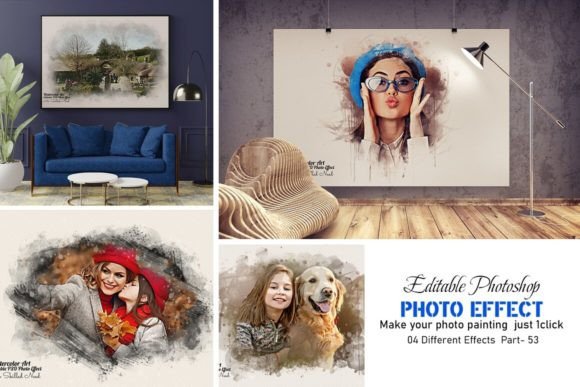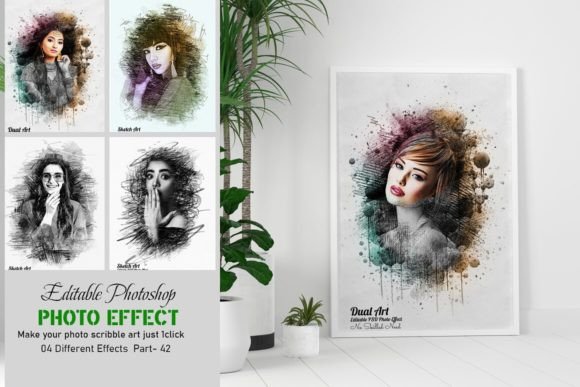
Master Editable Photo Art Effect Easily
Digital artistry often feels like a gated community, reserved for those who have spent years mastering brush strokes, color theory, and complex software interfaces. However, the landscape of creative design has shifted dramatically. Today, tools like an Editable Photo Art Effect bridge the gap between amateur photography and professional-grade digital painting. This technology allows users to transform standard photographs into stunning, painterly artworks without requiring any prior drawing skills. By leveraging smart object technology and pre-configured layers, these templates provide a shortcut to high-quality visual results, making them invaluable for a wide range of users from casual hobbyists to seasoned marketing professionals.
Understanding the Technology Behind the Art
At its core, an editable photo art effect is a sophisticated Photoshop template, typically delivered as a PSD file. Unlike static filters found in mobile apps, these templates are built with non-destructive editing in mind. The magic lies in the use of Smart Objects. When you place your photo into the designated Smart Object layer, the software automatically applies a series of complex adjustments, textures, and color grades that mimic traditional media such as oil paint, watercolor, or charcoal.
The beauty of this system is its flexibility. Because every element is separated into named groups and layers, you retain full control over the final output. You are not stuck with a single look. If the default color palette does not match your brand or personal preference, you can adjust the hue, saturation, and brightness independently. This level of customization ensures that the result looks professionally made, free from the common errors or pixelation associated with low-quality automated filters. The high-resolution nature of these files means they are suitable for both web display and large-format printing.
Why Beginners and Hobbyists Benefit Most
For individuals just starting their creative journey, the learning curve of digital painting can be discouraging. Learning to draw from scratch takes years of practice. An editable photo art effect removes this barrier entirely. A beginner can achieve what looks like a masterful painting in minutes simply by pasting their photo into the template. This immediate gratification is powerful; it encourages experimentation and helps new users understand how light, shadow, and texture interact in a digital space without the frustration of technical failure.
Consider a hobbyist photographer who wants to create unique gifts for family members. Instead of printing standard snapshots, they can use these templates to turn a family portrait into a timeless piece of wall art. The process is straightforward: open the file, replace the smart object, save, and let the software do the heavy lifting. The included help files usually guide users through this process, ensuring that even those with minimal Photoshop experience can navigate the interface confidently.
Professional Applications for Marketers and Entrepreneurs
While beginners value ease of use, professionals prioritize efficiency and consistency. For social media managers, bloggers, and small business owners, content creation is a daily demand. Producing unique, eye-catching visuals consistently is challenging. An editable photo art effect offers a reliable solution for creating branded content that stands out in crowded feeds.
Imagine a boutique clothing brand launching a new summer collection. Rather than hiring an illustrator for every product shot, the marketing team can use a cohesive set of photo effects to give their campaign a distinct artistic flair. Because the templates are multicolor and fully editable, they can align the artwork with specific brand colors. This ensures that while each image is unique, the overall aesthetic remains consistent. The ability to edit all layers easily means that text overlays, logos, or additional graphic elements can be integrated seamlessly, enhancing the commercial value of the final asset.
Educators and Content Creators
Educators and digital content creators often need to illustrate concepts in engaging ways. A history teacher might use these effects to make historical figures appear more dynamic in presentation slides, while a YouTuber could use them to create distinctive thumbnails that capture viewer attention. The versatility of the template supports various subjects, from landscapes to portraits, allowing creators to adapt the style to fit their narrative tone.
Furthermore, these tools serve as excellent educational resources themselves. By examining how the layers are structured—how adjustment layers interact with blend modes and masks—students of graphic design can reverse-engineer the process. It provides a practical example of professional workflow organization, teaching them the importance of naming layers and grouping elements logically. This dual function as both a production tool and a learning aid adds significant long-term usefulness.
Technical Compatibility and Ease of Use
One of the primary concerns for any user investing in digital assets is compatibility. A robust editable photo art effect template is designed to work across a wide spectrum of Adobe Photoshop versions. Whether you are using older versions like CS4, CS5.5, or CS6, or the latest iterations such as CC2023, the file structure remains accessible. This backward and forward compatibility ensures that you are not forced to upgrade your software unnecessarily, protecting your investment.
The user experience is streamlined for speed. The "no skill needed" promise is backed by the intelligent design of the PSD file. Key features include:
- Smart Object Integration: Simply double-click the smart object layer, paste your image, save, and close. The main document updates automatically.
- Organized Layer Structure: All layers are named and placed in logical groups. This organization allows for precise tweaks, such as adjusting the intensity of the paint effect or changing the background color without affecting the subject.
- High-Resolution Output: The templates are created to handle high-resolution images, ensuring that details remain sharp and crisp, which is critical for professional printing.
- Multicolor Options: Pre-set color variations allow for quick experimentation, helping users find the perfect mood for their image without starting from scratch.
Making the Right Choice for Your Needs
Deciding whether an editable photo art effect is right for you depends on your specific goals. If you are looking to develop fundamental drawing skills, this tool will not replace practice. However, if your goal is to produce high-quality visual content efficiently, it is an indispensable asset. It shifts the focus from technical execution to creative direction. You spend less time worrying about brush settings and more time deciding on composition, color harmony, and emotional impact.
For freelancers, this efficiency translates directly to profitability. Being able to deliver polished, artistic edits quickly allows you to take on more clients or reduce the time spent per project. For consumers, it offers a way to personalize their digital presence with a level of sophistication that was previously inaccessible. Ultimately, the value of these templates lies in their ability to democratize digital art, making professional results attainable for anyone with a vision and a photograph.
In a digital world saturated with generic imagery, having the tools to create unique, textured, and emotionally resonant art is a significant advantage. Whether you are enhancing a personal portfolio, boosting brand engagement, or simply exploring your creative side, an editable photo art effect provides the flexibility, quality, and ease of use necessary to bring your ideas to life.